What to put on a QR dog tag, and what to leave off
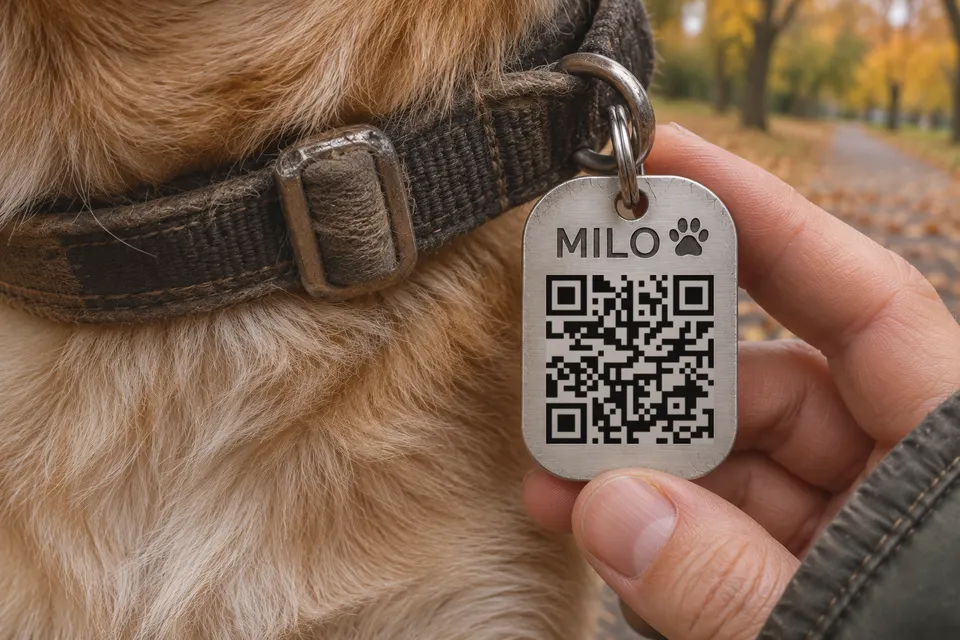
A QR dog tag can work without a subscription, and it belongs next to an engraved phone number and a registered microchip, not in their place. A finder without a smartphone or mobile signal can still read a number. Reading a microchip’s number requires a compatible scanner, such as those used by vets, shelters and animal services officers. Humane World for Animals says that “identification tags are your pet’s first ticket home” and that microchips should never be the main form of identification. The same page tells owners to update the chip registry when their phone number or email changes.
A QR tag also does not replace a tag your local law requires. Check that first, because the rules differ by country.
What to put on the page behind the code
Put these on the page, in this order:
- A button that calls you and a second one that sends a text or email.
- The pet’s name and a photo, so the finder can see that the page matches the animal.
- Urgent medical needs in one or two lines, such as insulin or seizure medication, and your vet’s phone number.
- A second contact, in case you cannot answer.
Your home address is optional on the page, and leaving it off is a privacy choice. Anyone who scans the code can read the page, so whatever you write there is visible to a stranger. A phone number lets the finder reach you without learning where you live.
What the physical tag must carry
In England, article 2 of the Control of Dogs Order 1992 requires a dog in a public place to wear a collar with the owner’s name and address. They must be inscribed on the collar or on a plate or badge attached to it. The Order lists exemptions for some working dogs. Other countries, states and towns have their own rules, so check yours before you order the tag. Add your phone number and the QR code alongside whatever is required.
Commercial QR pet tags compared
The table lists what three sellers say on their own pages, checked on 2026-11-17.
| Seller | Recurring fee for the core profile | Scan alert and location |
|---|---|---|
| PetHub | None; Basic is free | PetHub+ only, which is “Pay What You Can” |
| Ask A Vet | None; profile free for life | Alerts included |
| Paw ID | None; one-time payment | Email alerts included; SMS alerts need optional Premium |
Tag prices change and differ by region, so check the sellers’ shops: PetHub, Ask A Vet and Paw ID.
PetHub’s pricing page says Basic is “always free” and that scan notifications come with PetHub+. Ask A Vet lists “Real-time scan alerts included” and says optional premium app features are never required for the tag.
Location depends on the finder’s phone. Ask A Vet shows the scan location “using the finder’s device location”, and PetHub says the scanner’s “phone can share its location (with permission)”. It reports where the tag was scanned once, so it is not tracking. Live tracking needs a GPS collar, which is a different product. None of the pages read says what happens to your profile if the company closes.
Making a bebber for the tag
A bebber for a dog tag is the printed code plus a mobile page behind it. Your bebber page and the downloadable code are free, need no account and have no expiry. The physical tag and its engraving or printing are arranged separately, and those costs depend on your supplier.
In the creator at /create, switch to Advanced, pick the Blank template and use Add block for each of these:
- Phone, with your number.
- SMS or Email, with the second way to reach you.
- Image, with the pet’s photo.
- Text, with the pet’s name, urgent medical notes, your vet’s number and the backup contact’s number.
That is four of the five blocks the free plan allows per code. Finish with Create my bebber. You see the code, which you download as PNG, SVG or PDF, and you get an email with the edit link. Scanning the code opens the page with the call and message options.
When you move, travel or leave the dog with a sitter, open the edit link and change the page. The printed code stays the same.
bebber does not track the pet, and a scan does not send you a location. An email when the code is scanned is part of the paid Pro plan (9 EUR a month).
A password can be added for free, but a finder has to get in, so leave it off.
The code is a bebber.com link, so it works only while bebber runs. Keep the engraved phone number as the fallback, and read do QR codes expire for what that dependency means.
Size and engrave a readable dog tag
Before ordering, check that the downloaded code, including its clear border, fits the tag’s usable surface.
- The downloaded image already contains the clear border, four modules on every side, so do not add a second one. Count the modules along one side of the code, excluding the border. Module width in millimetres is the finished image width in millimetres divided by (modules per side + 8). DENSO WAVE specifies the four-module margin.
- Bitly says a code “should be at least 2 cm x 2 cm” to scan on most scanners. Treat that as a starting point. Bitly
- Laser-marking guides such as AP Lazer allow about 1 cm at the very least and say larger codes scan faster and more reliably.
- A bebber code holds a web address, so it has more modules, the small squares, than a short text. Count the modules on your own code and check the module size still works at the size the tag allows.
- Without an uploaded logo, a small bebber logo sits in the centre of the code. Look at your file and treat the centre as part of the artwork to test.
- Dark marks on a light surface scan best. QRStuff says scans depend on contrast between the engraved area and the surface. A light code on a dark tag can work but is less forgiving across phones and lighting.
- Engrave your phone number and the pet’s name on the other side, in plain text.
- Test the finished tag with two or three different phones before it goes on the collar.
To engrave a tag yourself, the laser engraving page has a test order from polarity to scrap test, a material table and a sizing formula.
Sources
- Humane World for Animals humaneworld.org
- Control of Dogs Order 1992 legislation.gov.uk
- PetHub pethub.com
- Ask A Vet askavet.com
- Paw ID pawid.co.uk
- Email alerts included; SMS alerts need optional Premium pawid.co.uk
- PetHub shop.pethub.com
- PetHub pethub.ladesk.com
- DENSO WAVE qrcode.com
- Bitly bitly.com
- AP Lazer aplazer.com
- QRStuff qrstuff.com
Read next
How to laser engrave a QR code that scans
Why an engraved QR code will not scan: a test order from polarity to scrap test, a material table, and a sizing formula with a worked example.
How big a 3D printed QR code must be to scan
3D printed QR code sizes for a 0.4 mm nozzle: module size, the four-module border, a width table and printing steps in PrusaSlicer.
Do QR codes expire? What seven tools say, and what bebber does
Do printed QR codes expire? Compare seven tools' stated policies, check your own code, and see what you can fix before reprinting.
Ready to make your own?
Same idea, your content — done in about a minute.
Create your bebberNo sign-up. No credit card. Free forever.