How to keep appliance manuals and receipts behind a QR sticker
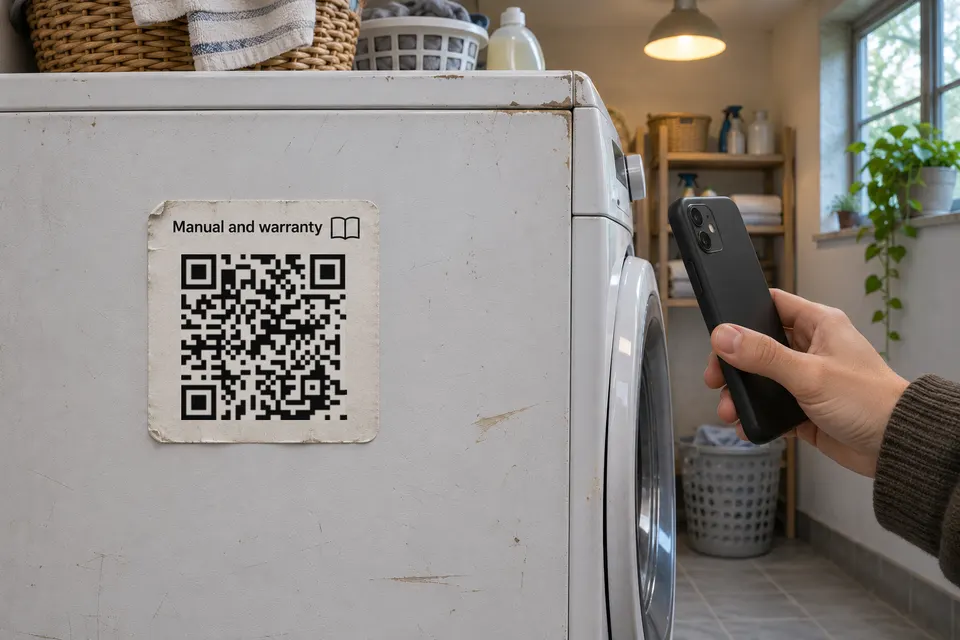
Put the appliance’s PDF manual, a photo of the receipt and the warranty end date on one mobile page, then stick that page’s QR code on the machine. Scanning the sticker opens the page. The code itself holds only a web address; the files sit on the page behind it, not inside the code.
What to store for each appliance
Make one page per appliance, so the sticker on the dishwasher opens the dishwasher’s papers and nothing else.
| Appliance | Upload | Write in a note |
|---|---|---|
| Washing machine, dishwasher | Manual PDF, receipt photo | Model, serial number, warranty end date |
| Fridge, oven, hob | Manual PDF, receipt photo | Model, serial number, installer or shop |
| Boiler, heat pump | Manual PDF, service report photo | Model, last service date, service company phone |
| Robot vacuum, small appliances | Manual PDF | Model, purchase date, warranty end date |
Photograph the rating plate on the appliance and copy the model and serial number into the note. Manufacturers ask for different identifiers. Bosch, for example, asks service callers for the model number (E-Nr.), the manufacturing number (FD) and the counting number (Z-Nr.), all found on the appliance’s type plate. Copy whatever your plate shows.
After a repair, add the date and the replaced parts to the note.
How the sticker reaches the files
The QR code contains a bebber.com address. Scanning it opens your bebber page, and the page shows the manual, the receipt photo and your notes. You can replace the contents later through the edit link bebber emails you, and the printed sticker stays the same.
This depends on the bebber service. If bebber stopped operating, the sticker would stop opening the page. Keep the original PDF and the paper or emailed receipt as well. If you own a website you can edit, a static code that points to a page on it avoids that dependency, though it then depends on your domain and hosting.
Privacy: receipts and warranty papers
A bebber page is not listed and search engines do not index it by default. Anyone who scans the sticker or has the link can open it. A password is optional and free.
A sticker in a kitchen can be scanned by every visitor, so leave these off the page:
- Your home address, if the receipt prints it.
- Card numbers, account details and customer numbers.
- Anything you would not hand to a guest.
Crop or cover those parts before you photograph the receipt. Add a password if the page must hold more than that. Before you sell the appliance or move out, open the page and decide what the next owner should see.
Create the appliance bebber
A page with a PDF, a photo and a note has several blocks, so it needs Advanced mode.
- Open /create and switch on the “Advanced” toggle.
- Pick the “Blank” template. On Page, use “Add block” to add the manual as a PDF block and the receipt as an image block. Add a text block for the appliance details and a phone block for the repair shop’s number.
- Continue through the steps Page, Code and Details, then press “Create my bebber”.
- Download the code as PNG, SVG or PDF. An email arrives with the edit link. Keep it, because that link changes the page later.
- Print the downloaded code on adhesive label paper suitable for your printer. The file already contains its clear border and background, so print it as it is and add no frame of your own.
The free plan holds 25 codes, 5 blocks per code and 25 MB of files per code. If the manual and the receipt together exceed 25 MB, shrink the PDF or photo, or use a button block that links to the manufacturer’s manual page instead.
Place the sticker
- Choose a spot you can reach without moving the machine, such as the inside of a door, the side panel or the front edge near the rating plate.
- Keep it away from hot surfaces such as the oven door, hob and radiator, and away from spots that get splashed. Check the label maker’s temperature and moisture limits before you choose the spot.
- Stick it on a clean, dry surface free of dust, oil and grease, as Avery’s application guide describes.
- Scan it with your phone after sticking it. Confirm the manual opens and the receipt photo is readable.
- Ask the other people in the household to scan it once.
Do QR codes expire covers how long a QR code keeps working and what it depends on. QR codes for signs covers code size and glare for printed placements.
Create your appliance bebber and start with the appliance you last searched a manual for.
Sources
- found on the appliance's type plate bosch-home.com
- clean, dry surface free of dust, oil and grease avery.com
Read next
Fuse box labels: a written circuit list first, a QR code for the extras
Keep a readable circuit list on the fuse box door. A QR code can add notes and contacts. Free circuit directory template and a placement checklist.
QR code inventory labels: what each label should open, and when software is needed
Create a bebber for tools or storage boxes with manuals, photos and contact details. Compare label materials, account limits and setup steps.
Do QR codes expire? What seven tools say, and what bebber does
Do printed QR codes expire? Compare seven tools' stated policies, check your own code, and see what you can fix before reprinting.
Ready to make your own?
Same idea, your content — done in about a minute.
Create your bebberNo sign-up. No credit card. Free forever.