Should you put a QR code on your resume or CV?
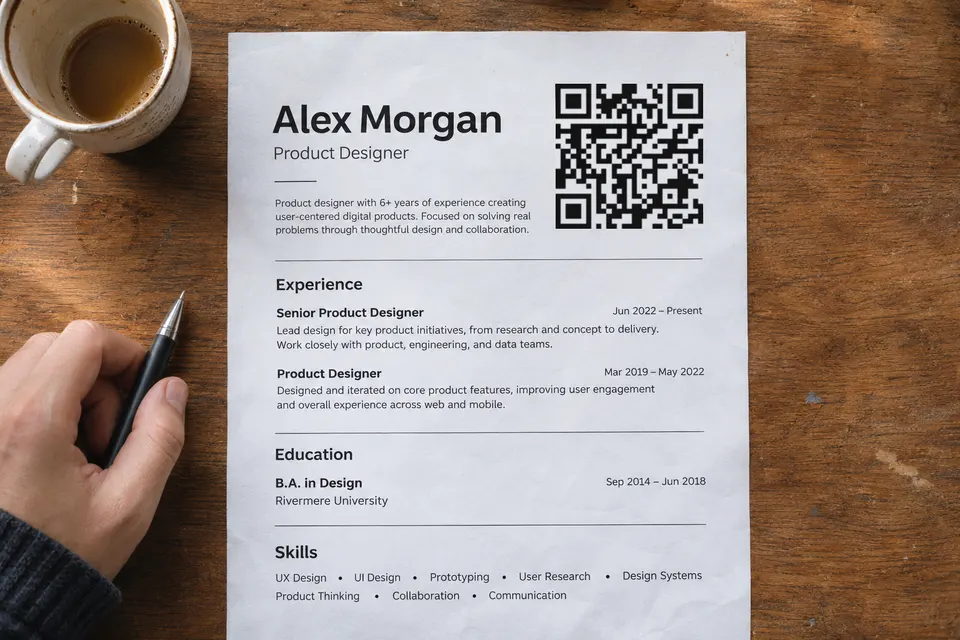
A QR code helps on a printed resume that a person holds, at a career fair or an interview, and only when it opens something the resume does not already contain, such as work samples. In an online application, leave it off: applicant tracking systems parse text, and Greenhouse’s help page lists graphics among the formatting that can cause a failed parse. Greenhouse says the resume then stays attached to the candidate, but someone has to enter the details by hand.
For online applications, use a clickable portfolio or LinkedIn link and keep everything essential as selectable text. Qualifications and contact details stay on the resume itself. The sources below do not establish what recruiters prefer today: Pollak’s informal Twitter question drew mixed answers.
Rules for a code on a printed resume
- Print the plain web address next to the code, for example with a caption such as “Portfolio: three selected projects” and the address under it. A code shown on the same phone that reads your resume takes extra steps to scan, and Lindsey Pollak recommends including both the URL and the code.
- Put it in the contact area. TopResume suggests near your name and at least 2 x 2 cm. Treat 2 to 2.5 cm as a starting point, not a guarantee.
- Keep the clear margin around the code. DENSO WAVE, the inventor of the QR code, requires four modules on every side. The file you download from bebber already includes that margin, so do not crop it and do not add a second border. Its width includes the margin, so the squares are smaller than the width suggests.
- Never make the code the only way to reach something important. Email and phone number stay as text.
- Print one copy at its final size and scan it with two different phones at the distance a reader will use, before printing fifty.
What should the code open?
If you only want people to see your LinkedIn profile, the LinkedIn app has its own code. LinkedIn’s help page (checked 2026-11-17) says to tap the QR icon in the search bar on the app’s homepage and open the My code tab, where you can save the code. Check the current app, because the page notes that sharing differs between iOS and Android.
Your bebber page can combine these blocks:
- a contact card that saves to the recruiter’s phone
- your resume as a PDF
- links to a portfolio or work samples
- a short video introduction
If you already maintain a website and its domain, a static QR code can point directly to it. The code still depends on that domain and page staying online. A bebber is for people who have no website to point at or do not want to run one.
Update the linked resume after printing
The printed resume stays as it was. You can update your bebber page after handing out the resume, and someone who opens it later sees the current PDF, projects and phone number. A PDF or contact card someone already saved stays unchanged.
An optional free bebber account adds basic scan counts. They show how often the code was scanned, not who scanned it, and bebber counts scans without storing IP addresses.
Free-plan limits and page access
- The free plan holds 5 blocks and 25 MB of files per code. The setup below uses up to four blocks; keep their combined files within 25 MB.
- Your bebber page is unlisted and not indexed by search engines. Anyone with its link or QR code can open it, and a password can be added for free.
- If bebber stopped operating, its codes would stop resolving.
Build your bebber resume page
- Open /create. It starts in Simple mode, which holds one piece of content, so switch on the “Advanced” toggle and pick the “Blank” template.
- Choose “Add block”, then the contact card. Enter your name, phone and email. The URL field is labelled “Website”; put your LinkedIn or portfolio address there.
- Choose “Add block” again, then PDF, and upload your resume.
- Add a link list block with your portfolio and project pages, and a video block if you have a short introduction. With the video, that makes four blocks.
- Continue through Page, Code and Details, enter your email, and press “Create my bebber”.
- You get the code to download as PNG, SVG or PDF, and an email with the edit link. Use that link later to swap the PDF. bebber may first ask you to verify your email address with a code, and the page goes live once you do. Open your bebber page and confirm visitors can download your resume PDF before you print.
The guide on whether QR codes expire compares seven tools’ stated policies and shows how to check a code you already printed.
Create your bebber resume page without an account.
Sources
- Greenhouse's help page support.greenhouse.io
- Pollak's informal Twitter question lindseypollak.com
- TopResume suggests topresume.com
- DENSO WAVE, the inventor of the QR code qrcode.com
- LinkedIn's help page linkedin.com
Read next
What to put behind the QR code on a graduation invitation
What to put behind a QR code on a graduation card or party table: map and details, a photo look-back, a gift link, a guest album and RSVP, all free.
How to let open house visitors scan to check in
Visitors scan a code at the door to sign in and take the listing home. Free route with a Google Form, Pro route with a built-in form, with exact steps.
Do QR codes expire? What seven tools say, and what bebber does
Do printed QR codes expire? Compare seven tools' stated policies, check your own code, and see what you can fix before reprinting.
Ready to make your own?
Same idea, your content — done in about a minute.
Create your bebberNo sign-up. No credit card. Free forever.