Collect wedding photos with a QR code on your invitation
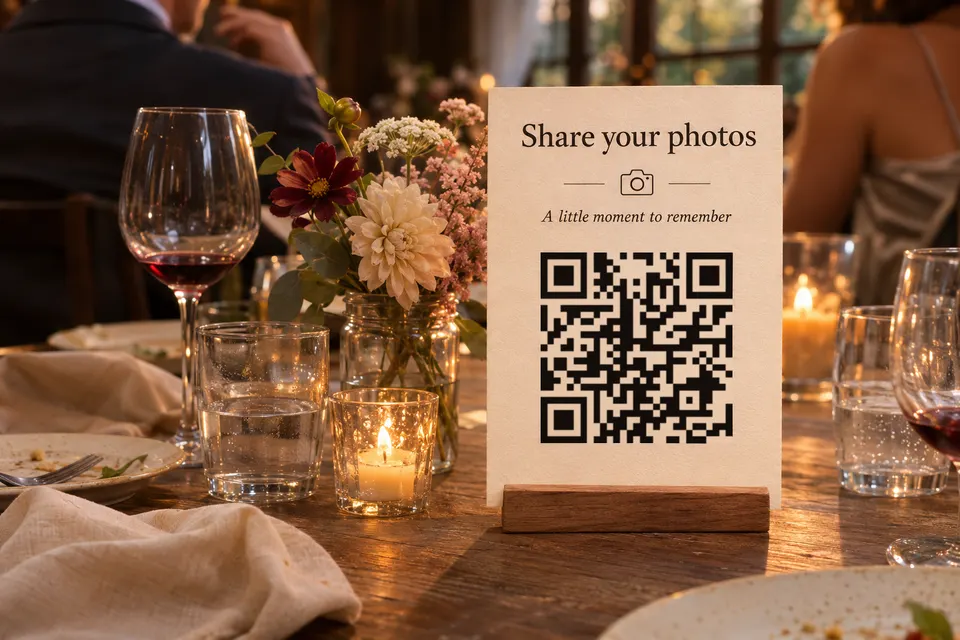
A QR code does not collect photos. It opens a web page, and for photos that page has to be a shared album or a wedding photo app where guests can add pictures. A bebber, the printed code plus the mobile page behind it, cannot receive guest uploads. It can hold the schedule, the address and a button to the album, and you can change all of that after the cards are printed.
Where guests can upload photos
Limits and prices below come from each provider’s own pages, checked on 2026-11-17. “Not stated” marks what the page leaves open.
| Option | Guest needs account or app | Limit | Cost |
|---|---|---|---|
| Google Photos shared album | Sign-in to add: not stated | 20,000 photos or videos per album | Album cost: not stated |
| Apple iCloud Shared Album | No account or Apple device for web contributions, from version 27 | See below | Version 27+ standard albums use the owner’s iCloud storage; temporary and version 26-or-earlier albums do not |
| Wedibox | No app or login | Free: 50 guest uploads | Free; $29, $49 or $79 one-time |
| Yogile | No guest app, no sign-up | Free albums last 7 days | Free; $44.99 a year: unlimited photos, 10 GB of video |
Google: the Collaborate setting must be on, and then anyone with the link can add photos. The page does not say whether a guest must be signed in, so test with a phone that has no Google Account.
Apple: web contribution without an Apple Account is described for iOS, iPadOS and macOS 27. Albums created in version 26 or earlier hold 5,000 items and allow up to 100 subscribers. Photos are reduced to 2,048 px on the long edge, except panoramas, which can be 5,400 px wide. Videos are limited to 15 minutes at up to 720p. Newer standard albums have no fixed item cap and 100 participants including the owner. Newer temporary albums are capped at 5,000 items and do not use the owner’s storage, but they expire 30 days after creation and delete any photos or videos not saved to a library.
Wedibox: the $29 plan is for embedding and has a 3-month upload window. The $49 plan has unlimited uploads, a 6-month upload window and 1 year of storage. The $79 plan has a 1-year upload window and 2 years of storage. Free-plan storage time is not stated. Yogile deletes free albums after 7 days unless you upgrade to Premium.
Set up the photo link and the page
Before step 1, check timing. The album must still accept uploads when invitations arrive and on the wedding day, and must still exist when late guests add photos. An Apple temporary album created while you prepare the invitations can expire before the wedding, so turn off “Make Album Temporary” for a longer collection. A free Yogile album is gone after 7 days. Download the photos before the provider’s deadline.
- Create the album with the provider and turn on guest contributions (Collaborate in Google Photos, Can Add Photos in iCloud).
- Add a test photo as a guest, on a phone that is not yours. It should appear in the album.
- Copy the album link.
- If you need replies on the free plan, publish a form with an external tool, such as Google Forms, and copy its responder link (see the RSVP section below).
- Open /create. It starts in Simple mode, which holds one piece of content. Switch on the “Advanced” toggle and pick the “Blank” template.
- Choose “Add block” for each row of this table:
| Block | Content | Destination |
|---|---|---|
| Text | Schedule | none |
| Address | Venue, with a directions link | none |
| Text | Dress code or gift note | none |
| Button “Reply to the invitation” | RSVP | the form’s responder link |
| Button “Add your wedding photos” | Photo album | the album link |
- Go through the steps Page, Code and Details, then press “Create my bebber”. You get the code to download as PNG, SVG or PDF and an email with the edit link.
A static code that points to a website you already run and edit works too. A bebber is for couples without a site to point at, or who do not want to run one.
Update your wedding bebber before and after the day
The printed code never changes, and the page behind it is edited with the emailed edit link. No account is needed.
| When | What the page shows |
|---|---|
| Before the day | Schedule, address with a directions link, dress code, reply button, photo button |
| On the day | Seating chart as an image or PDF, address, photo button |
| Afterwards | Photo button and a thank-you message |
The free plan holds 5 blocks and 25 MB of files per code. The “before” page uses all five.
On the day, replace the dress code, reply button and schedule with the seating chart image or PDF, which is one block. The “Add your wedding photos” button stays on every stage, so guests can upload during the wedding and afterwards. For a table-card code that always shows the seating chart, make a second bebber. The free plan allows 25 codes.
RSVP on the free plan and with Pro
A form built inside bebber needs the paid Pro plan, 9 EUR a month. On the free plan, link a button to a form the couple already has, for example one made with Google Forms. The answers stay in Google, not in bebber.
The Google Forms help says a form must be published before responders can open it. Its section on limiting responses notes that users must sign in to a Google Account. Open the published responder link on a phone that is signed out before printing, and use that link for the button.
Print size, contrast and testing
Uniqode’s printing guide divides the scanning distance by 10: a table card read from 30 cm gives about 3 cm, and a seating chart sign read from 1 m gives about 10 cm. These are estimates, and the printed proof decides. A bebber code encodes a web address, so it has more modules than a short text code; check your own proof.
- The code needs a blank margin at least four modules wide on every side (Denso Wave). The downloaded bebber file already includes it, so do not add another border or crop it off.
- Print the code darker than the background, at least 4:1 by the Uniqode guide.
- On glossy stock the guide adds 15 to 20 % to the size and says to test on the real finish. Test any foil, texture or coloured stock the same way.
- Print a line next to the code that says what the scan gives, for example “Schedule, map and photo album”.
- Scan a printed proof with at least three phones, including an older one, in two kinds of light, before the full print run. A wedding-specific test: scan the printed proof, open the wedding bebber, tap “Add your wedding photos”, upload as a guest and confirm the photo arrives.
Level H error correction, which bebber uses, can restore about 30 % of the codewords (Denso Wave). That is not a promise to survive any given damage, so a clean print is still needed.
Who can open your wedding page
A bebber page is not listed and not indexed by search engines. Anyone who scans the code or has the link can open it. You can add a password for free and print it on the card. The password protects the bebber page only. Set the album’s link and contribution permissions separately in Google Photos or iCloud, because a forwarded album link does not pass through the bebber page.
Photo retention and bebber availability
Guest photos live with the album provider, so check how long it keeps them. The page behind the code depends on bebber staying online; do QR codes expire compares what seven tools state about their codes.
For a printed seating plan or welcome sign, QR code signs has a size table and placement advice.
Create your wedding bebber with the tested album link behind “Add your wedding photos”.
Sources
- Google Photos shared album support.google.com
- Apple iCloud Shared Album support.apple.com
- Wedibox wedibox.com
- Yogile yogile.com
- Collaborate setting support.google.com
- web contribution without an Apple Account support.apple.com
- expire 30 days after creation and delete any photos or videos not saved to a library support.apple.com
- Google Forms help support.google.com
- Uniqode's printing guide uniqode.com
- Denso Wave qrcode.com
Read next
What to put behind the QR code on a graduation invitation
What to put behind a QR code on a graduation card or party table: map and details, a photo look-back, a gift link, a guest album and RSVP, all free.
Attach a video or voice message to a gift with a QR code
Put a QR code on a gift card or tag that opens your video or voice message. File limits, print size, where to place it and what to test before wrapping.
How big a QR code sign needs to be so people scan it
QR code sign size: start at the scanning distance divided by 10. Size table for counters, windows and yard signs, glare, placement, tamper checks.
Ready to make your own?
Same idea, your content — done in about a minute.
Create your bebberNo sign-up. No credit card. Free forever.